
Using Lastmodified Date
Lastmodified Date in WEB Collection
- Users can choose the source of the “last modified” date for documents in a Web Collection.
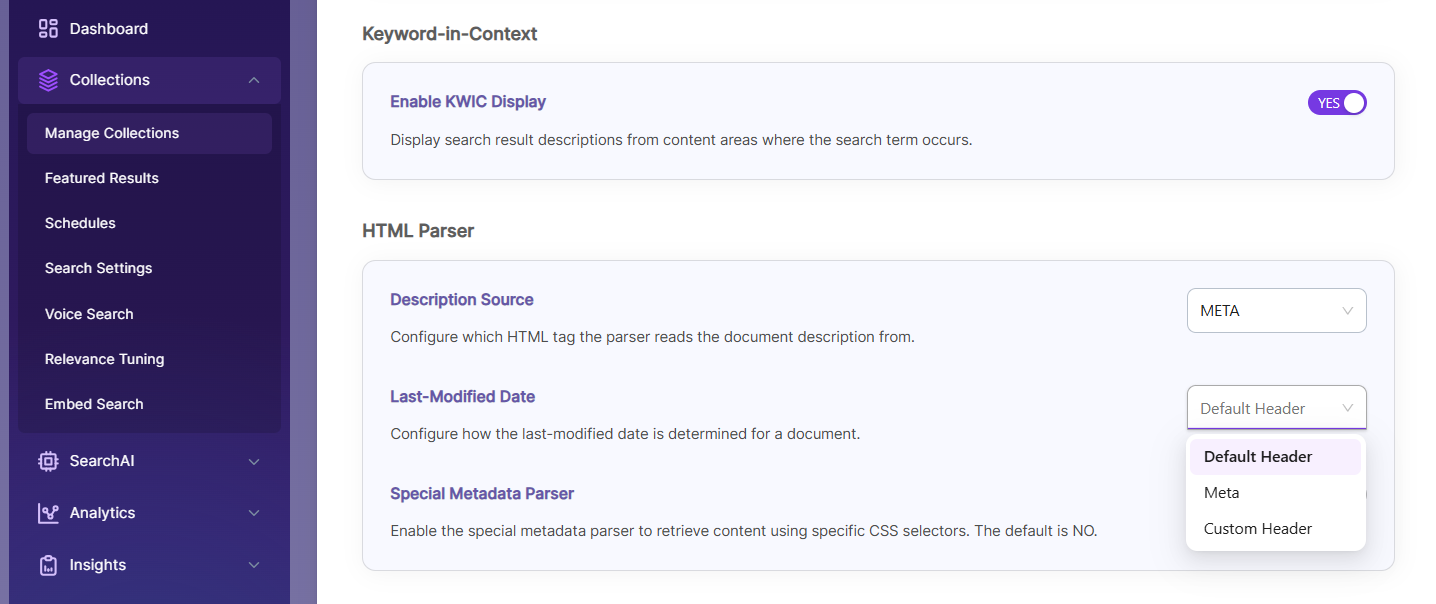
There are three options
- Default Header
- Meta
- Custom Header
Default Header
The system gets the last modified date from the webpage’s response header. This is the default option when creating a new Web Collection.
Meta
The system gets the last modified date from meta tags in the HTML page. The page must have meta tags named "lastmodified" or "last-modified". This helps index pages when the header date is missing or unreliable.
<meta name="lastmodified" content="Wed, 20 Jan 2018 04:30:15 GMT" />
or
<meta name="last-modified" content="Wed, 20 Jan 2018 04:30:15 GMT" />
Custom Header
The system takes the last modified date from a custom date set in the web server’s htaccess file. The date format must follow the Apache server documentation.
<IfModule mod_headers.c>
  Header set SearchBlox-Last-modified "Wed, 29 Feb 2020 15:33:18 GMT"
</IfModule>
If you want to use a custom last modified header name, you can update SearchBlox to use it.
You can set the SearchBlox Last Modified header name to your custom name by editing the file <SEARCHBLOX_INSTALLATION_PATH>/webapps/ROOT/WEB-INF/searchblox.yml :
http.lastmodified.header: SearchBlox-Last-modified
Example:
http.lastmodified.header: Custom-Last-modified
Updated 27 days ago