
Faceted Search
Faceted search allows you to filter and explore indexed information across multiple categories or dimensions, helping you quickly find the exact results you need.
Features and Facets
SearchBlox lets you customize your search using facets such as collections, keywords, file type, and date, allowing you to filter results using any combination of these options.
How to Perform a Faceted Search
The SearchBlox faceted search can be accessed through the following URL:
https://localhost:8443/search/index.html
Enter your search term in the search box and press Enter. The results page will open, with facets displayed on the left side.
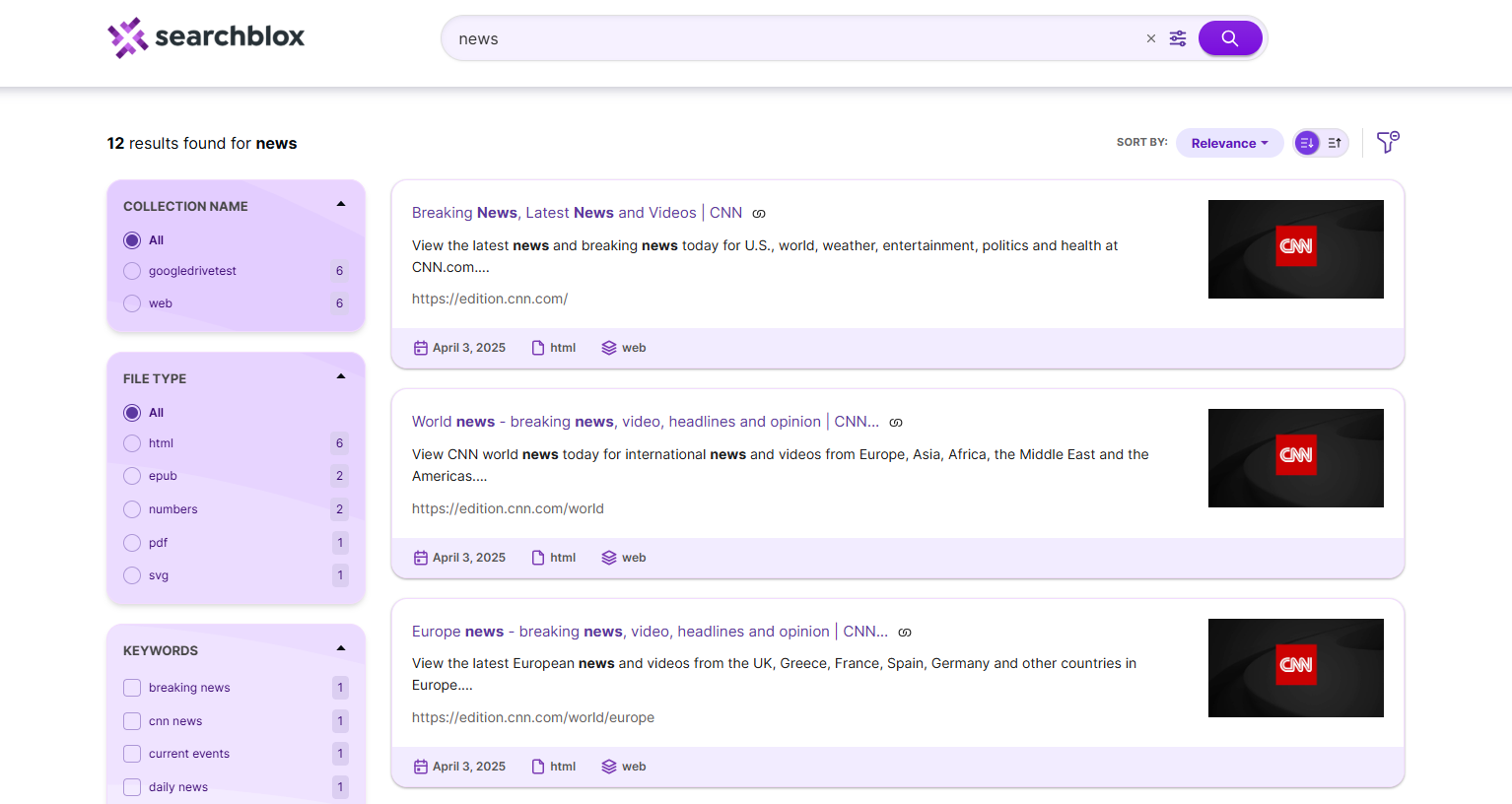
Facet Filters
-
The default filters such as File Type, Keyword, and Modified Date appear on the left side. When you select a filter, it appears with an x mark, which you can click to remove the filter.
-
File Type → Displays different file types that can be used to filter the search results.
-
Keywords → Shows related keyword options other than the entered search term.
-
Modified Date → Provides options such as last week, last month, last year, or a custom date range.
-
You can also add Collection as a facet by updating ../plugin/data/facet.json.
-
Collection → Shows which collections contain results for your search.
-
Other meta tags can also be added as facets in the same way.
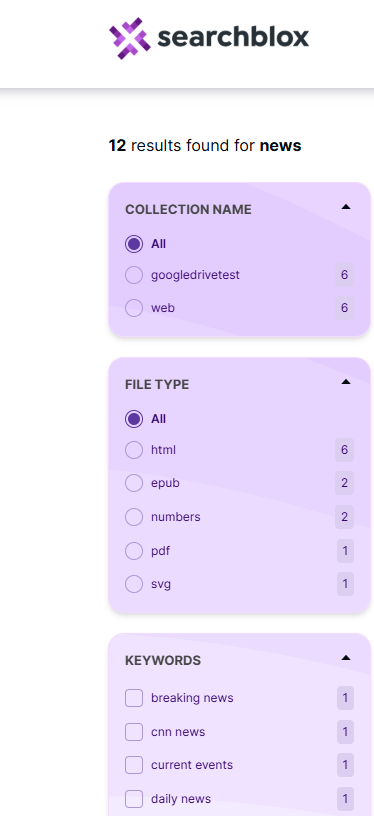
Adding a Facet in SearchBlox
SearchBlox also allows Collection, Title, Description, Language, Author, and Subject as facets. Author and Subject apply only to PDF files. The facet.js file controls the facet settings and is located at ../webapps/ROOT/search/facet.js after placing the plugin folder in SearchBlox. To add a new facet, define the field name, display name, and size (number of values to show) in facet.js. Facet filters can be string, number, or date types, except for predefined facets like keywords, title, description, size, or date. You can add custom facets by specifying them in facet.js (for example: facet field: "group").
Fields in facets.js
| Fields in facet.js | Description |
|---|---|
| facets | Fields used as facet filters. Default facets include collection, keywords, contenttype, and lastmodified date. |
| collection | Collections included in the search. Can be single or multiple (comma-separated). Example: "collection": [1,2]. |
| sortBtns | Fields that can be used for sorting results. |
| facetFiltersOrder | Defines the order in which facet filters appear on the search page. |
| facetsFiltersDisplay | Enables or disables the display of facet filters. |
| facetFiltersType | Defines the logic between facet filters. Default is AND, but OR can also be used. |
| sortDir | Specifies the sorting direction: ascending or descending. |
| pageSize | Determines the number of results per page in faceted search. |
| showAutoSuggest | Enable or disable Autosuggest. |
| autoSuggestLimit | Maximum number of suggestions when Autosuggest is enabled. |
| suggestSearch | Enable or disable auto-correction of mistyped search terms. |
| smartAutoSuggestSettings | Configure SearchAI Autosuggest. Example: "pluginDomain": "", "cnameAutoSuggest": "", "limit": "5", "langForSuggest": "en". |
| defaultCname | Default collection used for the initial search. |
| adsDisplay | Enable or disable featured results in the search results. |
| featuredResultsCount | Number of featured results to display. |
| predictSearch | Enable predicted results for the search term. |
| predictResultSize | Set the number of predicted search results to display. |
| customDateSettings | Enable or disable the custom date filter. Example: "customDateField": "lastmodified", "customDateEnable": true, "customDateDisplayText": "Custom". |
| relatedQuery | Enable or disable the related query feature. Default is true. |
| relatedQueryFields | Configure settings for related queries, including API key and limits. Example: "apikey": "...", "field": "content", "operator": "and", "limit": "5", "terms": "10", "type": "phrase", "col": "", "SB-PKEY": "". |
| topQuery | Enable or disable the top queries feature. |
| topQueryFields | Configure top queries settings. Example: "apikey": "", "col": "", "limit": "5", "SB-PKEY": "". |
| dataToBeDisplayed | For CSV or database collections, specify the fields to display in tabular format. "displayAll": true fetches all data. |
| tune | Enable relevancy tuning. Example: "enable": "true". |
| debug | Enable JSON response view. You can also add &debug=true in the search URL. |
| defaultType | Set the boolean operator for multiple search terms. Use AND for AND search; default is OR. |
| apikey | Used for secure search access. |
| autologout | Set session timeout. true = 30 minutes, false = 24 hours. |
| pluginDomain | Domain of SearchBlox used to fetch search results. |
The contents of facet.js are shown here.
window.facets = {
    "facets": [{
            "field": "colname",
            "display": "Collection Name",
            "size": "10"
        },
        {
            "field": "contenttype",
            "display": "File Type",
            "size": "10"
        },
        {
            "field": "keywords",
            "display": "keywords",
            "size": "10"
        },
        {
            "field": "lastmodified",
            "display": "Last Modified",
            "dateRange": [{
                    "name": "Last 24 hours",
                    "calendar": "days",
                    "value": "1"
                },
                {
                    "name": "Past Week",
                    "calendar": "days",
                    "value": "7"
                },
                {
                    "name": "Past Month",
                    "calendar": "months",
                    "value": "1"
                },
                {
                    "name": "Past Year",
                    "calendar": "years",
                    "value": "1"
                }
            ]
        }
    ],
    "customDateSettings": {
      "customDateField":"lastmodified",
      "customDateEnable":true,
      "customDateDisplayText":"Custom"
    },
    "collection": [],
    "sortBtns": [{
            "field": "lastmodified",
            "display": "Sort By Date"
        },
        {
            "field": "relevance",
            "display": "Sort By Relevance"
        }
    ],
    "facetFiltersOrder": [
      "colname","keywords"
    ],
    "facetsFiltersDisplay":true,
    "facetFiltersType": "AND",
    "sortDir": "desc",
    "matchAny": "off",
    "pageSize": "10",
    "showAutoSuggest": true,
    "autoSuggestLimit":"5",
    "suggestSearch":true,
    "smartAutoSuggestSettings":{
      "pluginDomain":"",
      "cnameAutoSuggest":"",
      "limit":"5",
      "langForSuggest":"en"
    },
    "defaultCname": "",
    "adsDisplay": true,
    "featuredResultsCount": "3",
    "predictSearch": "false",
    "predictResultSize": "3",
    "relatedQuery": false,
    "relatedQueryFields": {
        "apikey": "",
        "field": "content",
        "operator": "and",
        "limit": "5",
        "terms": "10",
        "type": "phrase",
        "col": "",
        "SB-PKEY":""
    },
    "topQuery": false,
    "topQueryFields":{
      "apikey":"",
      "col":"",
      "limit":"5",
      "SB-PKEY":""
    },
    "dataToBeDisplayed": {
        "1": {
            "title": "Title",
            "description": "Description"
        },
        "other": {
            "description": "Description"
        },
        "displayAll": true
    },
    "tune": {
        "enable": "true",
        "tune.0": "5",
        "tune.1": "3",
        "tune.2": "2",
        "tune.3": "5",
        "tune.4": "180",
        "tune.5": "10",
        "tune.6": "10"
    },
    "debug": false,
    "defaultType": "AND",
    "apikey":"",
    "autologout":true,
    "pluginDomain": ""
};- To add a meta field as a facet, the field must first be mapped in mapping.json. For CSV, Database, MongoDB, and AWS collections, map the values in csv.json, jdbc.json, mongodb.json, or amazonS3.json located at ../webapps/ROOT/WEB-INF/.
- To add a facet field of type number or date, update the field in mapping.json for web and file collections. For CSV, Database, MongoDB, and AWS collections, map the values in the respective JSON files mentioned above. Reference: Custom Fields in Search
Sorting Search Results
- In faceted search, users can sort results by date or relevance using the drop-down at the top of the search results or search box. The default sort order is descending.
- You can also set the sort order (ascending or descending) using URL parameters. A custom field can be used for sorting by defining it in facet.js.
AutoSuggest
- **Autosuggest/Autocomplete is enabled by default in faceted search for past queries. It can be turned off from the search settings if needed.
AutoSuggest
Passing Parameters Through Faceted Search URL
In faceted search, filter search results by passing the parameters along with the query as shown in the following URL:
https://localhost:8443/search/index.html?query=news AND keywords:cnn&public=true
More than one parameter can also be passed through the URL:
https://localhost:8443/search/index.html?query=news AND keywords:cnn AND content:world&public=true
- In faceted search, you can pass many parameters like filter, collection, pagination, sort, search type, tune, and more.
- Example URL:
https://localhost:8443/search/index.html?page=1&pagesize=10&query=test&sort=lastmodified&sortdir=desc&adsDisplay=true&f.colname.size=10&f.contenttype.size=10&f.keywords.size=10&f.lastmodified.range=[2019-06-20T16:00:48TO*]&facet.field=colname&facet.field=contenttype&facet.field=keywords&facet.field=lastmodified&predictResultSize=3&predictSearch=false&relatedQuery=true&tune=true&tune.0=5&tune.1=3&tune.2=2&tune.3=5&tune.4=180&tune.5=10&public=true
Related Queries
- In SearchBlox v10, the plugin can show related queries for a given search term. To enable it, update ../plugin/facet.js and provide your API key from SearchBlox Admin Console → License page. The SB-PKEY can be obtained from SBAdmin or an Admin user of SearchBlox.
"relatedQuery": true,
    "relatedQueryFields": {
        "apikey": "BFC82BE93A351C018CB27C32E1138047",
        "field": "content",
        "operator": "and",
        "limit": "5",
        "terms": "10",
        "type": "phrase",
        "col": ""
        "SB-PKEY": ""
    },
Providing relatedQuery as "false" will disable this feature.
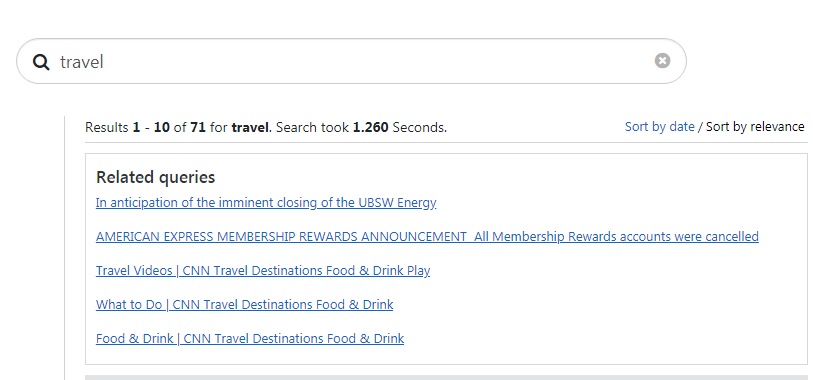
Predicted Results
- SearchBlox v10 includes predicted results on the faceted search page, displaying results predicted for the entered search term.
- To enable this feature, set predict Search to true in ../search/facet.js. You can also configure the number of predicted results to display in the same file.
"predictSearch": "true",
    "predictResultSize": "3",
Updated 24 days ago