
Related Queries in Search and API
Related Queries Search
Related Queries Search Configuration
This feature is disabled by default. To enable it and configure the plugin search, edit the facet.js file located at: <SEARCHBLOX_INSTALLATION_PATH>/webapps/ROOT/search/facet.js as shown below:
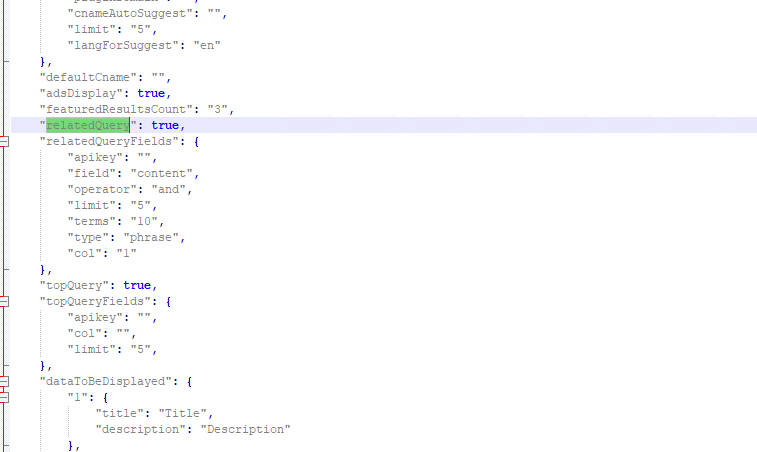
Set 'relatedQuery' to true.
Related Queries Search Response
Since the limit is set to 5, you will receive 5 related query suggestions based on the documents indexed in the collection(s).
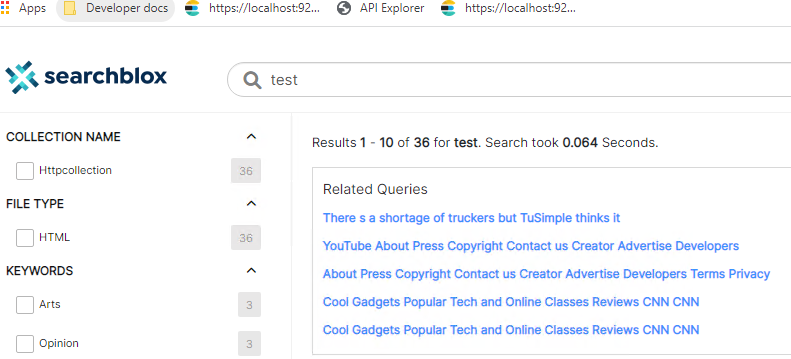
Related Queries via API
The Related Queries API allows you to get queries that are related to a search term. You can configure different parameters to get related search terms. See the next section for more details about the Related Queries API.
API Request
https://localhost:8443/rest/v2/api/related/query
Method
POST
Media Type
application/json
Headers
content-type : application/json
accept: application/json
Headers
SB-PKEY
LmfxTTDSeYxHTntJMHuhwRrGVICMaVN/wl/zPuQ3LtQDNRMnng5GpKIkgt0q1rCC/h6wDA==
Document Syntax
{
"apikey":"ADB9E38C363A5AB7B17E34956D21543B",
"field":"content",
"col":"1,2,3",
"type":"phrase",
"operator":"or",
"limit":20,
"terms":5,
"query":"test"
}
Document Description
| JSON Attribute | Description |
|---|---|
| apikey | Your API key, which you can find in the SearchBlox Admin Console or in the config.xml file. |
| field | The field used to get related terms, such as content, keywords, title, description, or a custom field. |
| col | The Collection ID from which the search should return results. |
| type | The type of match: phrase for exact match or fuzzy for approximate match. |
| operator | The operator used between words in the search query: AND or OR. |
| limit | The number of related queries that should be returned. |
| terms | The number of associated terms returned for each query. |
| query | The search term or query entered by the user. |
| SB-PKEY | An extra security key for SBAdmins/Admin users, available in the Users tab in the Admin Console. |
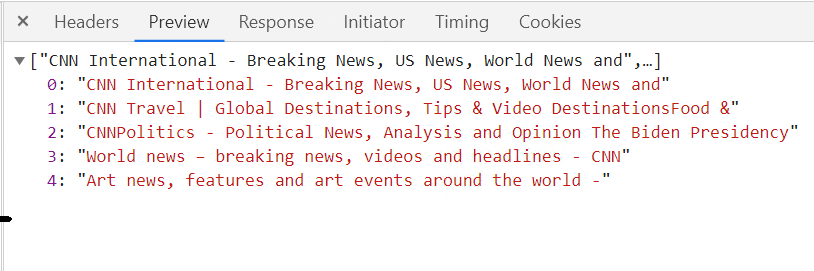
Sample JSON Response
Add a sample JSON response example here so users can see what the API output looks like. Without this, the section is incomplete.
Updated 27 days ago