
Tabbed Search
Tabbed Search is a faceted search interface in SearchBlox v12.2 .
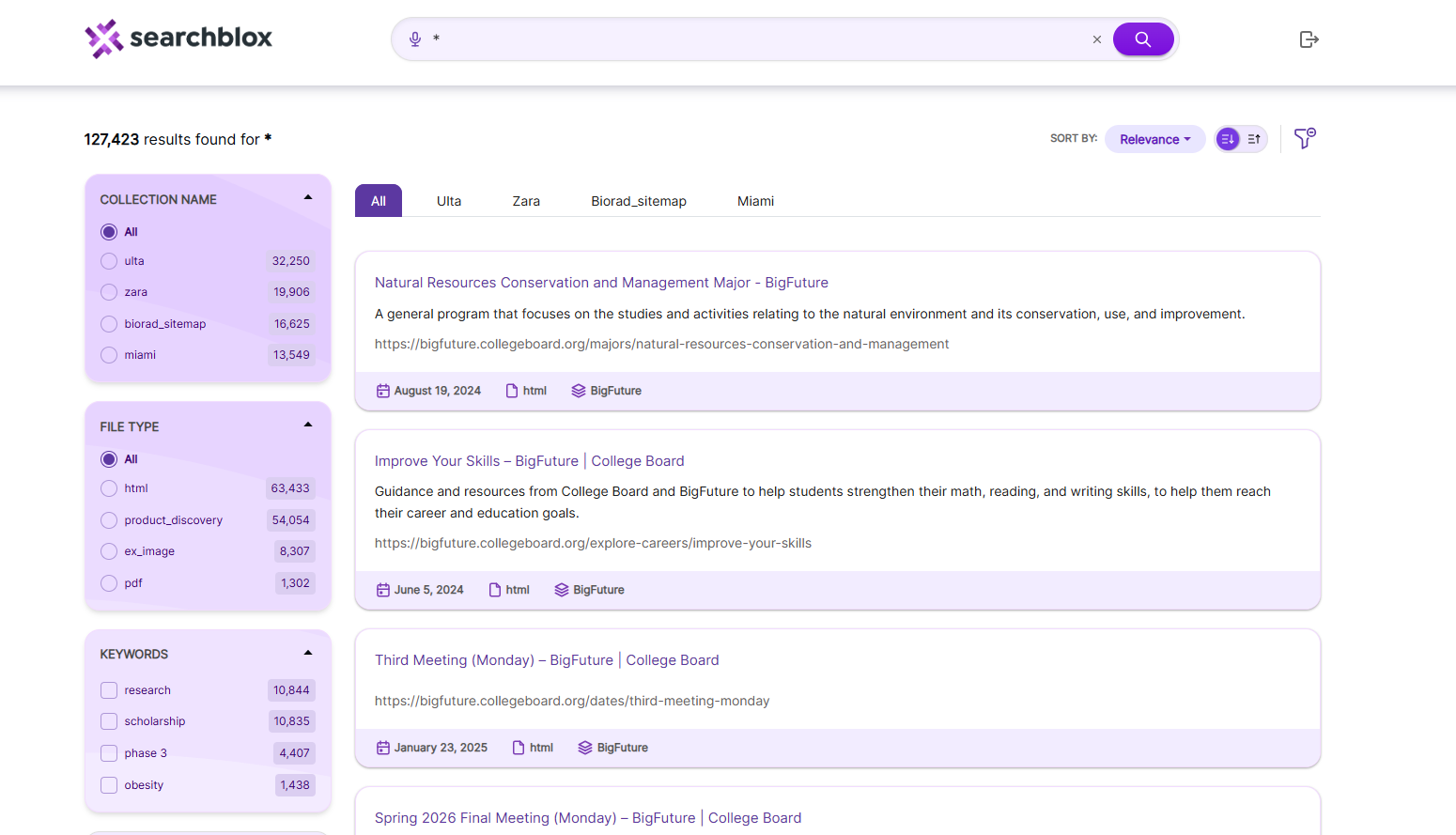
It lets you view search results in separate tabs based on collections. You can see results from all collections together or switch between individual collection tabs.
To access the Tabbed plugin, use the link in your build:
https://localhost:8443/tabbed/index.html
Prerequisite
Before using the Tabbed plugin, create and index multiple collections in SearchBlox. Each collection will appear as a separate tab in the search interface.
Steps to use Tabbed Plugin
-
After creating and indexing the collections, open the plugin using:
https://localhost:8443/tabbed/index.htmlThen perform some searches to see how the results appear.
Fields in facets.js
The content of facet.js are as shown:
window.facets = {
    "facets": [{
            "field": "colname",
            "display": "Collection Name",
            "size": "10"
        },
        {
            "field": "contenttype",
            "display": "File Type",
            "size": "10"
        },
        {
            "field": "keywords",
            "display": "keywords",
            "size": "10"
        },
        {
            "field": "lastmodified",
            "display": "Last Modified",
            "dateRange": [{
                    "name": "Last 24 hours",
                    "calendar": "days",
                    "value": "1"
                },
                {
                    "name": "Past Week",
                    "calendar": "days",
                    "value": "7"
                },
                {
                    "name": "Past Month",
                    "calendar": "months",
                    "value": "1"
                },
                {
                    "name": "Past Year",
                    "calendar": "years",
                    "value": "1"
                }
            ]
        }
    ],
    "collection": [],
    "sortBtns": [{
            "field": "lastmodified",
            "display": "Sort by date"
        },
        {
            "field": "relevance",
            "display": "Sort by relevance"
        }
    ],
    "facetFiltersOrder": [
      "colname","keywords"
    ],
    "facetFiltersType": "AND",
    "sortDir": "desc",
    "matchAny": "off",
    "pageSize": "10",
    "showAutoSuggest": "true",
    "defaultCname": "",
    "adsDisplay": "true",
    "featuredResultsCount": "3",
    "predictSearch": "false",
    "predictResultSize": "3",
    "customDateDisplayText":"Custom",
    "customDateEnable":"true",
    "relatedQuery": false,
    "relatedQueryFields": {
        "apikey": "",
        "field": "content",
        "operator": "and",
        "limit": "5",
        "terms": "10",
        "type": "phrase",
        "col": ""
    },
    "collectionNameDisplay" : [
      {"colId":"","colNameDisplay":"All"},
      {"colId":"1","colNameDisplay":"collection1"},
      {"colId":"2","colNameDisplay":"collection2"},
      {"colId":"3","colNameDisplay":"collection3"},
      {"colId":"4","colNameDisplay":"collection4"},
      {"colId":"5","colNameDisplay":"collection5"}
    ],
    "dataToBeDisplayed": {
        "1": {
            "title": "Title",
            "description": "Description"
        },
        "other": {
            "description": "Description"
        },
        "displayAll": true
    },
    "tune": {
        "enable": "true",
        "tune.0": "5",
        "tune.1": "3",
        "tune.2": "2",
        "tune.3": "5",
        "tune.4": "180",
        "tune.5": "10"
    },
    "defaultType": "",
    "pluginDomain": ""
};
The details of all the fields used in the above js file are explained in the table that follows.
| facets | Facet fields don’t work in tabbed search, so changing them has no effect. |
| collection | Choose which collections to use. List one or more numbers, separated by commas. |
| SortBtns | Choose which fields can be used for sorting results. |
| facetFiltersOrder | Decide the order in which facet filters are shown. |
| sortDir | Set the sort direction: ascending or descending. |
| pageSize | Set how many results appear per page. |
| showAutoSuggest | Turn AutoSuggest on or off. |
| defaultCname | Pick the default collection to search when the page loads. |
| adsDisplay | Turn featured results on or off. |
| featuredResultsCount | Set how many featured results should be displayed. |
| predictSearch | Turn predicted search results on or off. |
| predictResultSize | Set options for how predicted search results are displayed. |
| customDateDisplayText | Change the label text for custom date filters. |
| customDateEnable | Turn custom date filtering on or off. |
| relatedQuery | Turn related queries on or off. Default is true. |
| relatedQueryFields | If you want related queries in search results then specify the API key within the field. Also you can limit it based on collection by giving specific column number. "apikey": "BFC82BE93A351C018CB27C32E1138047", "field": "content", "operator": "and", "limit": "5", "terms": "10", "type": "phrase", "col": "" |
| collectionNameDisplay | The collections and the names to be displayed for the same has to be specified in this section. The collection id has to be specified in colId field and the name of the Collection to be displayed in colNameDisplay If you want results from all collections then the following has to be specified {"colId":"","colNameDisplay":"All"}, For specific collection the following has to be specified {"colId":"1","colNameDisplay":"collection1"}, |
| dataToBeDisplayed | For CSV or database collections, list the fields to show in a table. If "displayAll": true, all fields will be shown. |
| tune | Improve search result relevancy by enabling it: "enable": "true". |
| defaultType | Sets the search operator. "AND" means all terms must match; if not set, it uses "OR" by default. |
| pluginDomain | The SearchBlox domain from which the plugin should fetch results. |
Configuring Collection tabs for Tabbed Plugin
You can choose which collections appear in the tabs by editing the facet.js file. Specify the collection ID and the display name for each collection. To create a tab that shows all collections, leave the collection ID empty. Use this section in facet.js to customize how collections are displayed in the tabs.
"collectionNameDisplay" : [
      {"colId":"","colNameDisplay":"All"},
      {"colId":"1","colNameDisplay":"HTTP"},
      {"colId":"2","colNameDisplay":"News"},
      {"colId":"3","colNameDisplay":"File"},
      {"colId":"4","colNameDisplay":"Database"},
      {"colId":"5","colNameDisplay":"CSV"}
    ],
Updated 12 days ago