
Insights
Insights can be accessed from the SearchBlox Admin Console. Super Admin or Admin permissions are required.
Insights Overview
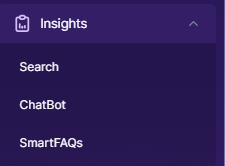
The Insights section in SearchBlox gives administrators a centralised view of analytics and performance data across Search, ChatBot, and SmartFAQs. Use it to understand how users interact with your system, identify content gaps, and make data-driven improvements to search relevance, chatbot accuracy, and FAQ effectiveness.
Key Capabilities and Benefits
What Insights Provides
- Tracks user interactions across Search, ChatBot, and SmartFAQs
- Identifies high-performing and low-performing content
- Highlights opportunities for optimization
- Provides visibility into user trends and behavior patterns
- Enables data-driven decisions to continuously improve search and AI-driven experiences
Insights Categories
Search Insights
Provides detailed analytics on how users interact with search functionality. It includes reports on query performance, clicked URLs, optimization opportunities, and search trends. These insights help improve search relevance and content ranking.
ChatBot Insights
Analyzes user interactions with ChatBots. It provides visibility into user queries, response effectiveness, conversation patterns, and areas where the chatbot may need improvement. This helps enhance chatbot accuracy and user satisfaction.
SmartFAQs Insights
Tracks the performance of FAQ-based interactions. It highlights frequently asked questions, user engagement, and the effectiveness of responses. This helps in refining FAQ content and improving self-service support.
Insights categories
| Category | What It Covers |
|---|---|
| Search Insights | Query performance, clicked URLs, search trends, and optimization opportunities |
| ChatBot Insights | User queries, response effectiveness, and conversation patterns |
| SmartFAQs Insights | FAQ engagement, frequently asked questions, and response effectiveness |
Updated 19 days ago