
MCP Prompts & Skills Guide
This guide covers two types of prompts you can use with SearchBlox through Claude:
- Part 1: Administration Prompts - configure, manage, and operate SearchBlox (collections, chatbots, FAQs, settings, etc.)
- Part 2: Content Analysis Prompts - ask Claude to read content from a SearchBlox collection and produce analytical deliverables (synopses, mind maps, comparisons, reports)
- Part 3: Claude Skill-Powered Use Cases - A Claude skill is a file that teaches Claude how to handle a specific job.
Part 1: Administration Prompts
How to Use
Use this prompt with Claude to discover and use any SearchBlox administration tool:
I want to use SearchBlox to [explain what you want to do]. Tell me which tool, what parameters it needs, and give me example prompts.Replace [explain what you want to do] with any use case from the list below.
Note:
- If you have multiple SearchBlox MCP connected (for example, searchblox_dev and searchblox_prod), include the MCP name in your prompt so Claude knows which one to target. For example: "I want to use searchblox_dev to list all collections..."
- When adding or updating allow/disallow paths with multiple URLs, include the following note in your prompt, as shown in the example below: Note: URLs should be newline-separated, not comma-separated.
In searchblox, on collection <collection-name>, set allowed paths to <url> and disallowed paths to <url>.Note: URLs should be newline-separated, not comma-separated.Available Use Cases by Category
- Collections: Create a collection, List all collections, Get collection settings, Update collection settings, Delete a collection, Manage collection permissions, Configure collection LLM settings and Manage collection prompt templates.
- Documents: Add a document to a collection, Update an existing document, Delete a document, Search document content, Browse documents, Count documents, Get document by URL.
- Search: Run a keyword search, Run a hybrid search, Run a RAG search, Run a vector search, Clear search cache.
Suggestions and Autocomplete: Get autocomplete suggestions, Get smart suggestions, Get location-based suggestions, Manage SmartSuggest configurations, Index and populate SmartSuggest. - Chatbots: Create a chatbot, Chat with a chatbot, List all chatbots, Test a chatbot, Delete a chatbot, Vote on chatbot responses, Chat with sources, View chatbot analytics, Search chatbot conversations and messages, Configure chatbot v2 settings, View chatbot usage statistics.
- SmartFAQs: Generate FAQs from content, Create, update, or delete an FAQ, Search FAQs, Bulk import or export FAQs, View FAQ analytics, Manage FAQ lifecycle (activate, deactivate), Track FAQ impressions, View FAQ insights.
- Knowledge Graph: Rebuild the knowledge graph, Get knowledge graph status and statistics, Search KG entities, Retrieve KG entity details, Query KG triples, predicates, topics, and facts, Traverse the knowledge graph, Visualize the knowledge graph, Browse knowledge graph data, Run RAG queries on the knowledge graph, Administer knowledge graph settings.
- Product Knowledge Graph: Search products in the Product KG, Smart search with AI query understanding, Decompose queries into product attributes, Browse products by facets and attributes, Get product details by ID, Get product recommendations, Find related and similar products, Compare products, Administer Product KG settings and field mappings, View Product KG statistics and visualizations.
- Product Discovery: List products in a Product Discovery collection, Search products with filters, Get product details, Find similar products, Get available brands, Get available categories, Visual product search (image-based).
- Checkout and Cart: Create a checkout session, Get checkout session state, Update checkout session (customer info), Add a product to the cart, Update item quantity in the cart, Remove an item from the cart, Set fulfillment method and destination, Get available fulfillment methods, Estimate shipping cost, Complete the checkout, Cancel a checkout session, Check UCP service health, Get UCP capabilities, Get UCP discovery profile.
- Featured Results and Ranking: Manage featured or promoted results, Set manual rankings to override result positions.
- Recommendations: Get document recommendations, View recommendation analytics, Track recommendation events.
- Analytics: View query analytics and logs, View unified search analytics, View search insights, Generate a pcode for session tracking, Validate a pcode, Initialize a pcode session with metadata, Get pcode session activity (searches and clicks), Get full customer journey for a session.
- Customer and User Profiles: Manage customer profiles for e-commerce platforms, Manage user profiles for document and website search collections.
- Agents: Create, update, or delete agents, Invoke an agent, Orchestrate multiple agents, Query agent execution history, Manage scheduled agent jobs.
- AI Assist: Process documents with AI, Manage AI prompts for collections and chatbots, Manage the flexible prompt template system.
- Sitemap: Configure sitemap collection paths, URLs, filters, and crawl settings, Monitor sitemap sync operations, Trigger or stop sitemap sync, Manage sitemap collection lifecycle.
- Document Context: Rebuild document context, Check document context status, Retrieve document context, Browse document context, Get document context facets.
Example: How to Use a Use Case
Pick any use case from the list above and plug it into the prompt:
I want to use searchblox to create a dynamic auto collection for JavaScript-rendered pages. Tell me which tool, what parameters it needs, and give me example prompts.Claude will respond with the tool name, all schema parameters, and a ready-to-use example prompt with placeholders that you can copy, fill in, and run.
Part 2: Content Analysis Prompts
Ask Claude to read a SearchBlox collection and return the content as a synopsis, mind map, decision tree, checklist, comparison, timeline, or report. Mention the collection, topic, and format you want.
Example Prompts by Deliverable Type
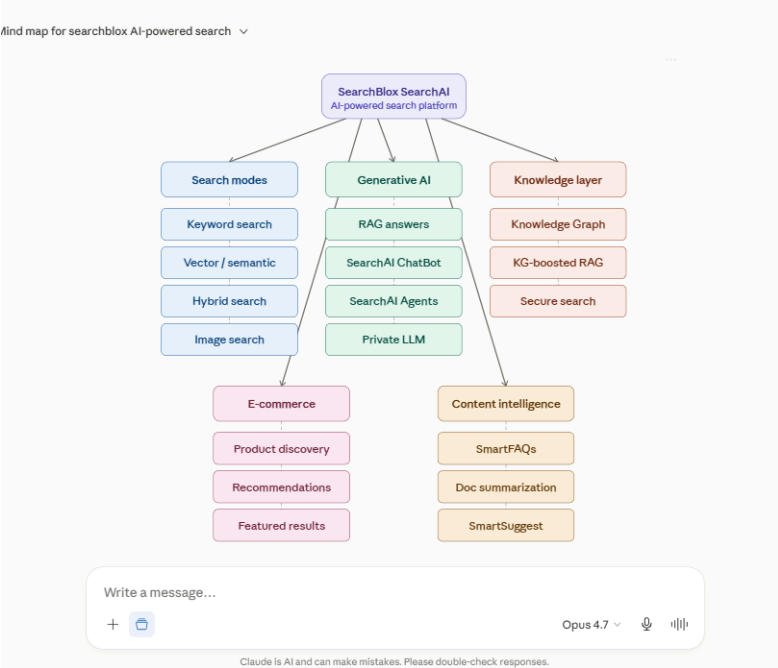
Use Case 1: Visual Mind Map from Indexed Content
What it does - turns indexed document content into an interactive mind map from a single prompt.
The prompt
Create a mind map from the searchblox collection for AI-powered search features in searchbloxSample output
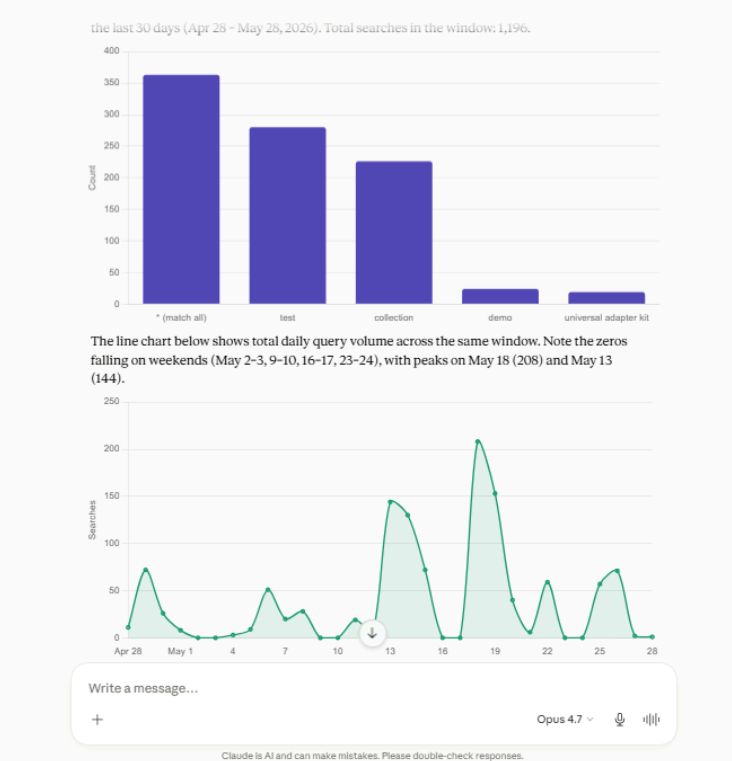
Use Case 2: Search analytics dashboard
What it does - Turns search query logs into visual analytics bar charts of top queries, trend lines over time from a single prompt.
The prompt
Show me the top 5 search queries in the “searchblox” collection from the searchblox environment over the last 30 days. Include query frequency and trends. Present the results as a bar chart (queries vs. count) and a line chart showing query volume over time.Sample output
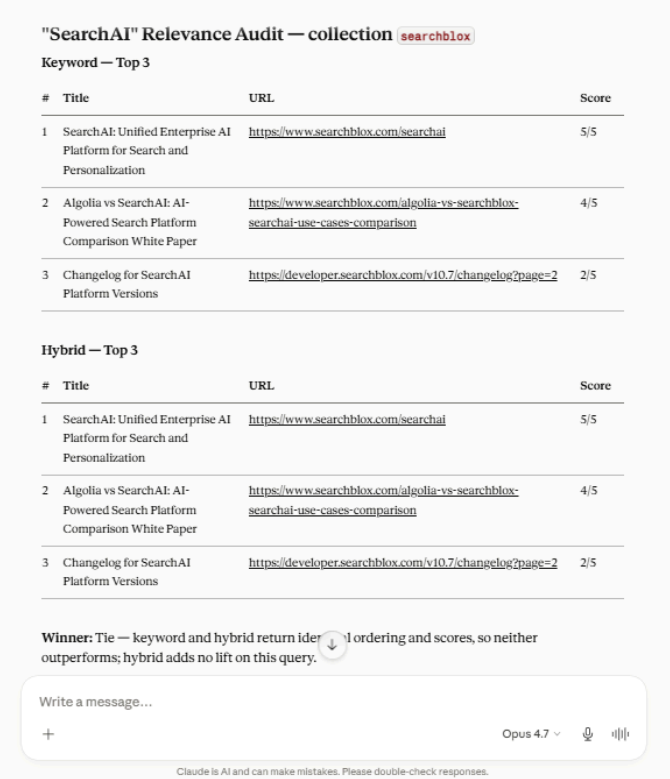
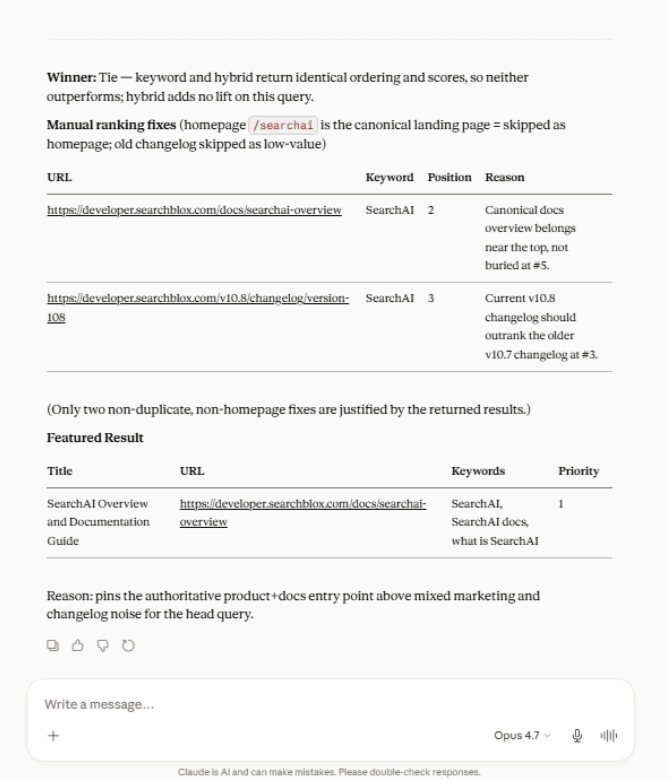
Use Case 3: Invoke the search-relevance-workflow agent
What it does - Runs the search-relevance-workflow agent to audit a single query across keyword and hybrid search, score the top results, pick the stronger ranking, and propose manual ranking + featured result fixes - all in one agent call.
The prompt
Invoke the "search-relevance-workflow" agent on SearchBlox (searchblox_agent,action="invoke",agentName="search-relevance-workflow",collection="searchblox") to audit how "SearchAI" performs. Show me the top 3 results from both keyword and hybrid search with their URLs, titles, and a 1–5 relevance score, then pick a winner in one line. Suggest up to 3 manual ranking fixes (URL, keyword, position), skipping the homepage and any duplicates, plus one Featured Result (title, URL, keywords, priority.Add a one-line reason for each suggestion, use only real URLs from the result.Sample output
Use Case 4: Bulk-Import SmartFAQs from CSV into a Collection
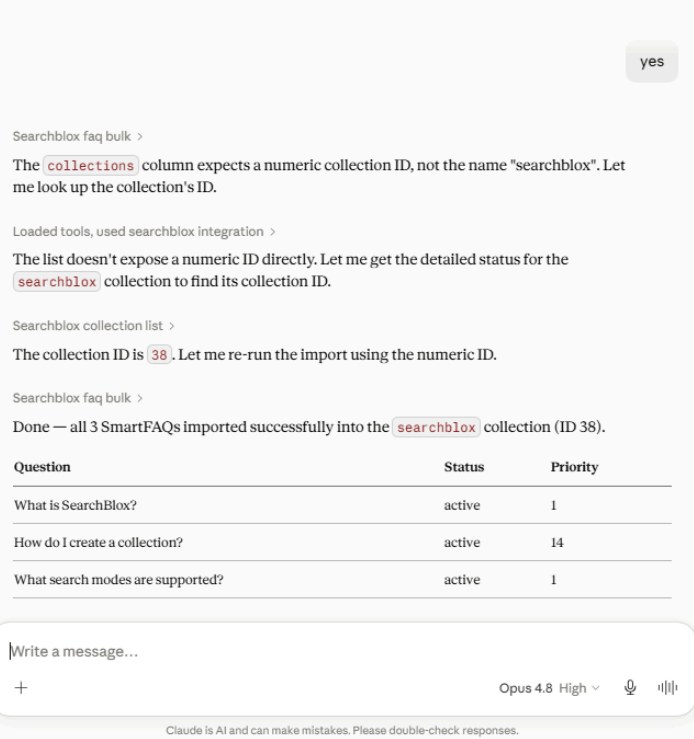
What it does - Load hundreds of SmartFAQs into a SearchBlox collection from a spreadsheet in one conversation, no manual data entry.
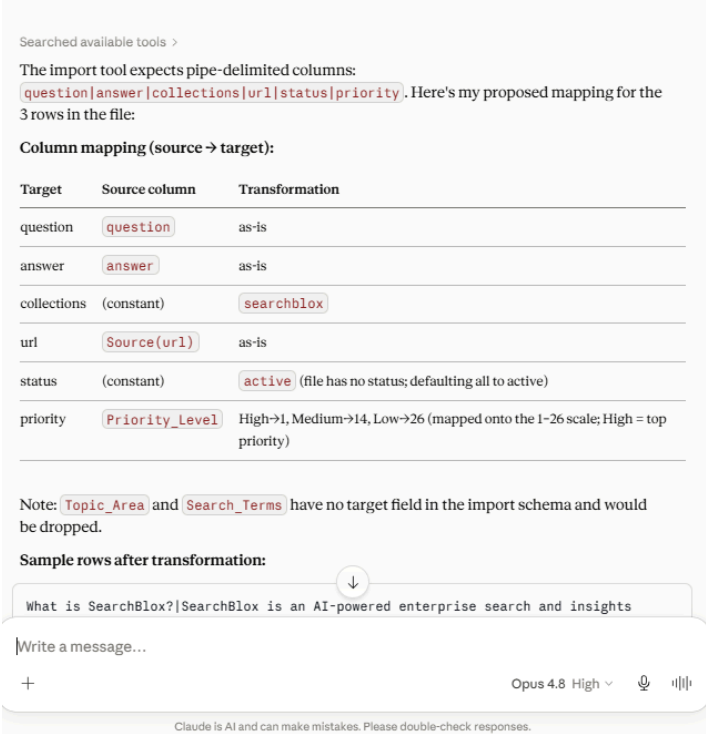
From an uploaded file, Claude reads the content, figures out which columns map to question, answer, URL, and priority, confirms the mapping, and bulk-loads everything into the right collection. What normally takes hours of copy-paste in the admin UI takes one prompt.
The prompt
In the searchblox instance, bulk-import SmartFAQs from the attached file into the "searchblox" collection.

- Read the attached file first (convert to CSV if it isn't already).
- Show me the column mapping (source → question/answer/url/status/priority) with 1-2 sample rows, then wait for my approval.
- status should be active or inactive (not published/draft/archived).
- Priority should be a number from 1 to 26, derived from the source data (not labels like High/Medium/Low).
Sample output
Preview before Approval
After Approval
Part 3: Claude Skill-Powered Use Cases
A Claude skill is a file that teaches Claude how to handle a specific job. Upload it once to Claude, and it will be used automatically whenever a matching question comes up.
How to upload a skill to Claude
- Go to claude.ai → Settings → Capabilities
- Click Upload skill and select the SKILL.md file
- Test it in Claude with a sample question
How to use it in Claude
- SearchBlox Content Gap Finder
Audits a SearchBlox collection's search analytics to find what users aren't finding, and suggests fixes using Featured Results, Manual Rank, and SmartFAQs.
You can download the skill here: https://github.com/SearchBlox-Software-Inc/searchblox-skills-gallery/blob/main/searchblox-content-gap-finder.skill
Just ask naturally:
Audit 'searchblox' collection for content gaps.Or call it by name:
/searchblox-content-gap-finder Find low-CTR queries in the searchblox collection.Tips for Better Prompts
- Always name SearchBlox in your prompt - it is the safest and clearest pattern.
- Specify the collection name when relevant to save a round-trip.
- Specify your Claude MCP instance in your prompt (searchblox or searchblox_prod) if you have multiple connections.
- Ask Claude not to execute yet if you want to review parameters first — just add "don't run it yet" to the prompt.
- Use plain English in [explain what you want to do] - you do not need to know tool names.
Updated 23 days ago