
Setup HAProxy for Cluster
HAProxy Load Balancer Configuration for SearchBlox Cluster
HAProxy can be configured as a load balancer to distribute search queries across the Search Servers in a SearchBlox Cluster. This guide covers installing, configuring, and starting HAProxy for use with a SearchBlox Cluster setup.
HAProxy Installation
For CentOS 7:
Run the following command to install HAProxy:
yum install haproxyFor Ubuntu 18.04:
Run the following command to install HAProxy:
apt-get install haproxyUpdate Configuration File
Open the Configuration File:
Edit the HAProxy configuration file located at:
/etc/haproxy/haproxy.cfgUse the vi editor or any text editor:
vi /etc/haproxy/haproxy.cfg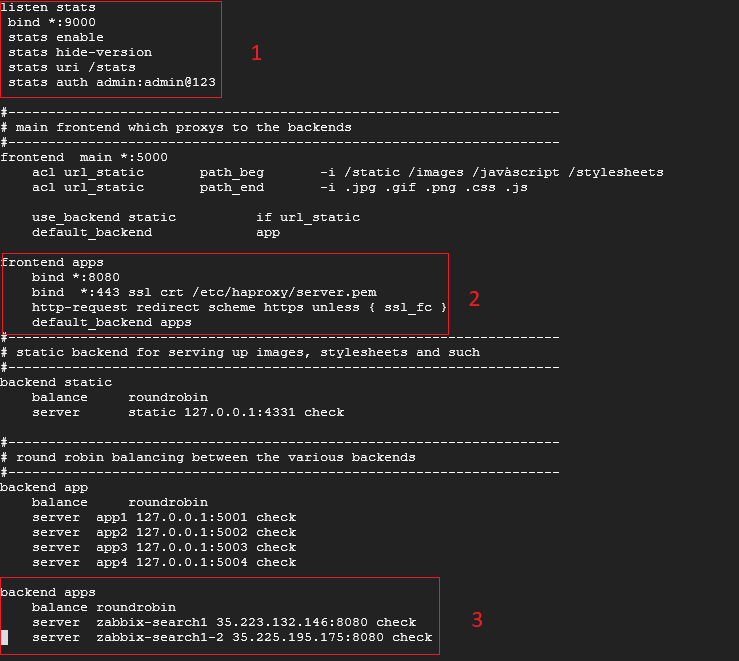
The following numbered items correspond to the highlighted sections in the configuration screenshot above:
-
To Enable HA Proxy dashboard configuration
Note: You can enable HAProxy Dashboard if required -
Enabling the Load Balancer for HTTPS applications
Note: You will need to provide the SSL certificate. -
For adding the servers into load balancing configuration
Start HA Proxy Server
To start haproxy
systemctl start haproxyTo get status of haproxy
systemctl status haproxy
Updated 29 days ago