
Agents
The Agents page lists all configured SearchAI Agents with options to run, clone, or delete each agent.
Agents Overview
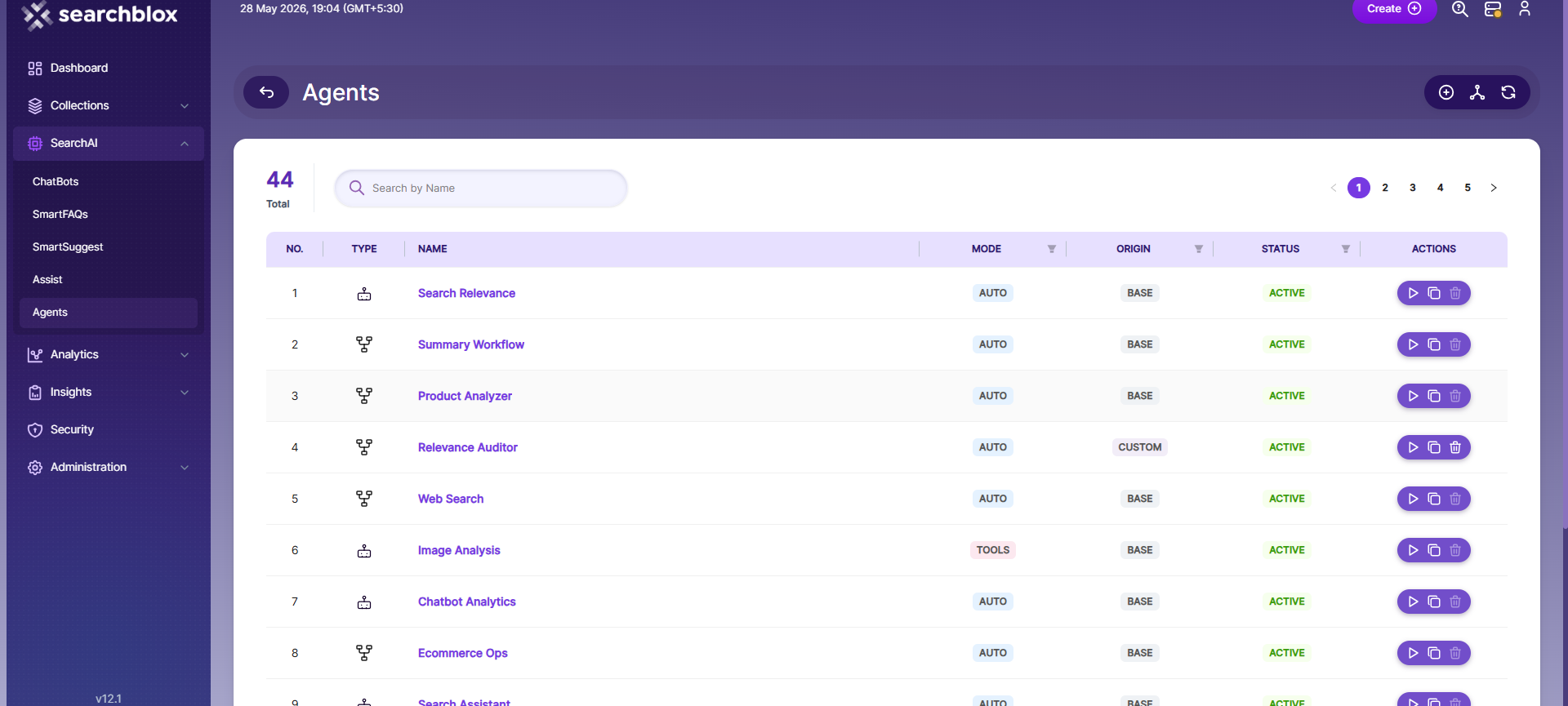
The Agents page lists all configured SearchAI Agents in the system. It currently displays 43 agents across 5 pages, with each agent identified by its type, name, mode, origin, and status.
Agent List Columns
- Type — Indicates the agent type, represented by an icon.
- Name — The agent's display name (e.g., Search Relevance, Summary Workflow, Product Analyzer).
- Mode — The execution mode, either TOOLS (uses specific tools to complete tasks) or AUTO (automatically determines the best approach).
- Origin — Indicates whether the agent is a BASE (built-in) agent or a custom one.
- Status — Shows whether the agent is Active or inactive.
- Actions — Options to Run (▶), Clone (⧉), or Delete (🗑) an agent.
Available Controls
- Search by Name — Quickly locate an agent by name.
- Create (⊕) — Add a new agent.
- Hierarchy View (⎇) — Visualize agent relationships and dependencies.
- Refresh (↻) — Reload the agents list.
NOTE : To learn more about configuring and managing Agents, refer to the SearchAI Agents documentation.
Updated 12 days ago
Did this page help you?