
Knowledge Graph Wiki Plugin
The Knowledge Graph Wiki Plugin is an interactive, browser-based interface that lets users
explore the SearchBlox Knowledge Graph visually — browsing entities, reading documents,
navigating relationships and topics, and discovering connections through a graph visualisation
canvas.
The plugin is a standalone web application that installs as a folder on your web server and
connects to any SearchBlox deployment. No additional software is required.
Prerequisites
- SearchBlox v12.1 or later with Knowledge Graph enabled
- A collection with Knowledge Graph extraction configured
- A web server capable of serving static files (Apache, Nginx, or any CDN)
**NOTE:**The plugin works alongside other SearchBlox
plugins. If you are also using the Hybrid Search Plugin
or the RAG Search Plugin, each can be deployedInstallation- Download the Knowledge Graph Wiki Plugin package from the SearchBlox Downloads
page. - Extract the package and copy the wiki folder (or rename it as needed) into your web
server's plugins directory. A typical path would be /plugins/wiki/. - Open index.html inside the plugin folder and update the configuration values (see
Configuration below). - Access the plugin in your browser at https://your-server.com/plugins/wiki/.
NOTE: The plugin folder can be renamed freely
(e.g. /plugins/my-wiki/).
The plugin automatically detects its own
deployment path and adjusts all internal
links accordingly — no additional configuration is
needed when renaming.
- Download the Knowledge Graph Wiki Plugin package from the SearchBlox Downloads
Configuration
All configuration is done by editing three hidden fields in the plugin's index.html file. No
rebuild or code change is required.
| Field | Description | Example Value |
|---|---|---|
| sb-domain | The full URL of your SearchBlox server. Leave empty if the plugin is hosted on the same server as SearchBlox. | https:// search.company.com |
| sb-collection | The ID of the collection to load by default when the plugin opens | 3 |
| sb-collection-name | The display name shown for the default collection. | Product Docs |
Example index.html snippet:
<input type="hidden" id="sb-domain" value="https://search.company.com" />
<input type="hidden" id="sb-collection" value="3" />
<input type="hidden" id="sb-collection-name" value="Product Docs" />
Note: If sb-domain is left empty, the plugin sends all requests to the same server it is hosted on. This is the recommended setup when SearchBlox and the
plugin share a server
Selecting a Collection
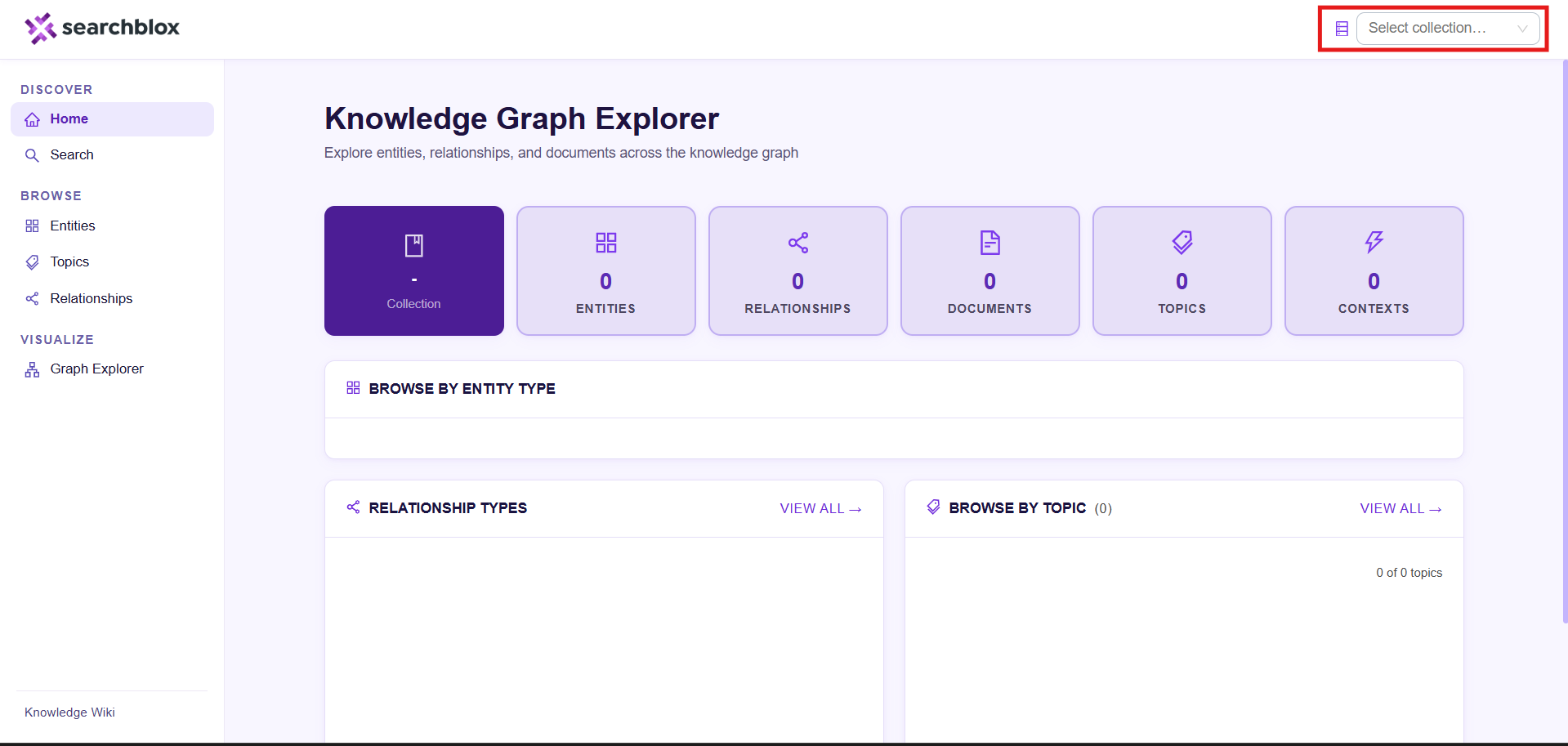
A collection selector dropdown appears in the top header on every page of the plugin
How it works
- Select any collection from the dropdown to load its knowledge graph data across all pages.
- Click the × button inside the dropdown to clear the selection and browse without a collection filter.
- The selected collection is saved in the page URL (e.g. ?col=3&cname=ProductDocs), so sharing a link or refreshing the page will retain the same collection.
- If a default collection is set in index.html, it will be pre-selected when the plugin first loads.
Pages & Features
Home Page
The Home page provides a summary dashboard for the selected knowledge graph
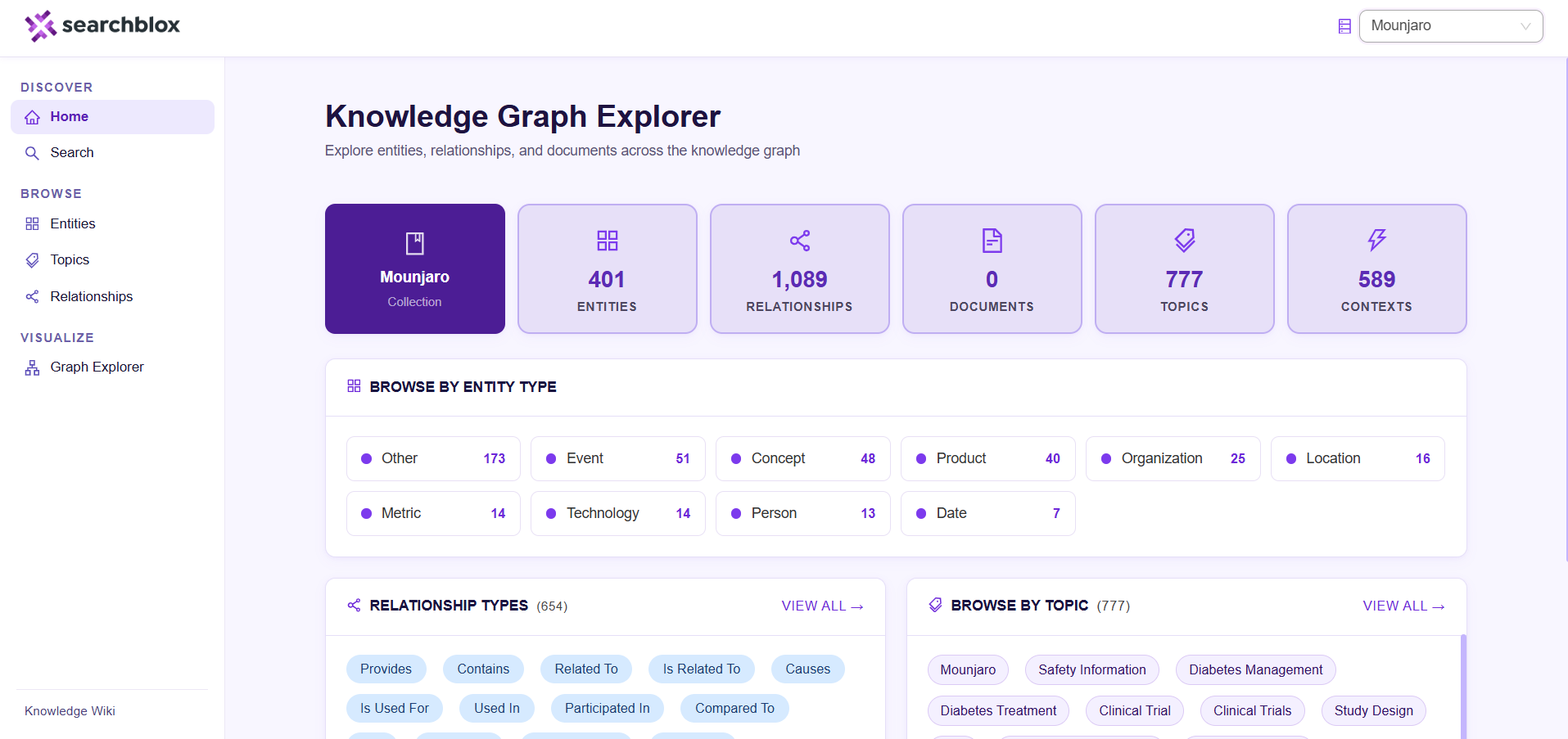
Statistics cards at the top show at a glance:
| Card | What it shows |
|---|---|
| Collection | The name of the active collection, or "–" if none is selected |
| Entities | Total number of entities extracted from the collectio |
| Relationships | Total number of relationships (triples) identified |
| Documents | Total number of source documents indexed |
| Topics | Total number of topics identified across documents |
| Contexts | Total number of document chunks processed |
By Clicking the Entities, Relationships, Documents, or Topics cards navigates directly to the corresponding Brow
- Browse by Entity: This type shows a grid of all entity categories (e.g. Person, Organization,
Technology, Product) with their counts. Clicking any tile takes you to the Browse page filtered to
that entity type.** - Relationship Types: It shows all relationship categories identified in the knowledge graph (e.g.
"Developed By", "Used For", "Is Part Of") with their counts. Clicking Show more reveals
additional relationship types. - Browse by Topic: It shows a scrollable tag cloud of all knowledge graph topics. Click Load more
to display additional topics. Clicking any topic tag takes you to the Topic detail page.
Search Page
The Search page lets you find content across both entities and documents simultaneously.
To search:
- Type your query into the search bar at the top of the page and press Enter or click the
search button. - Results appear below in two sections — Entities and Documents.
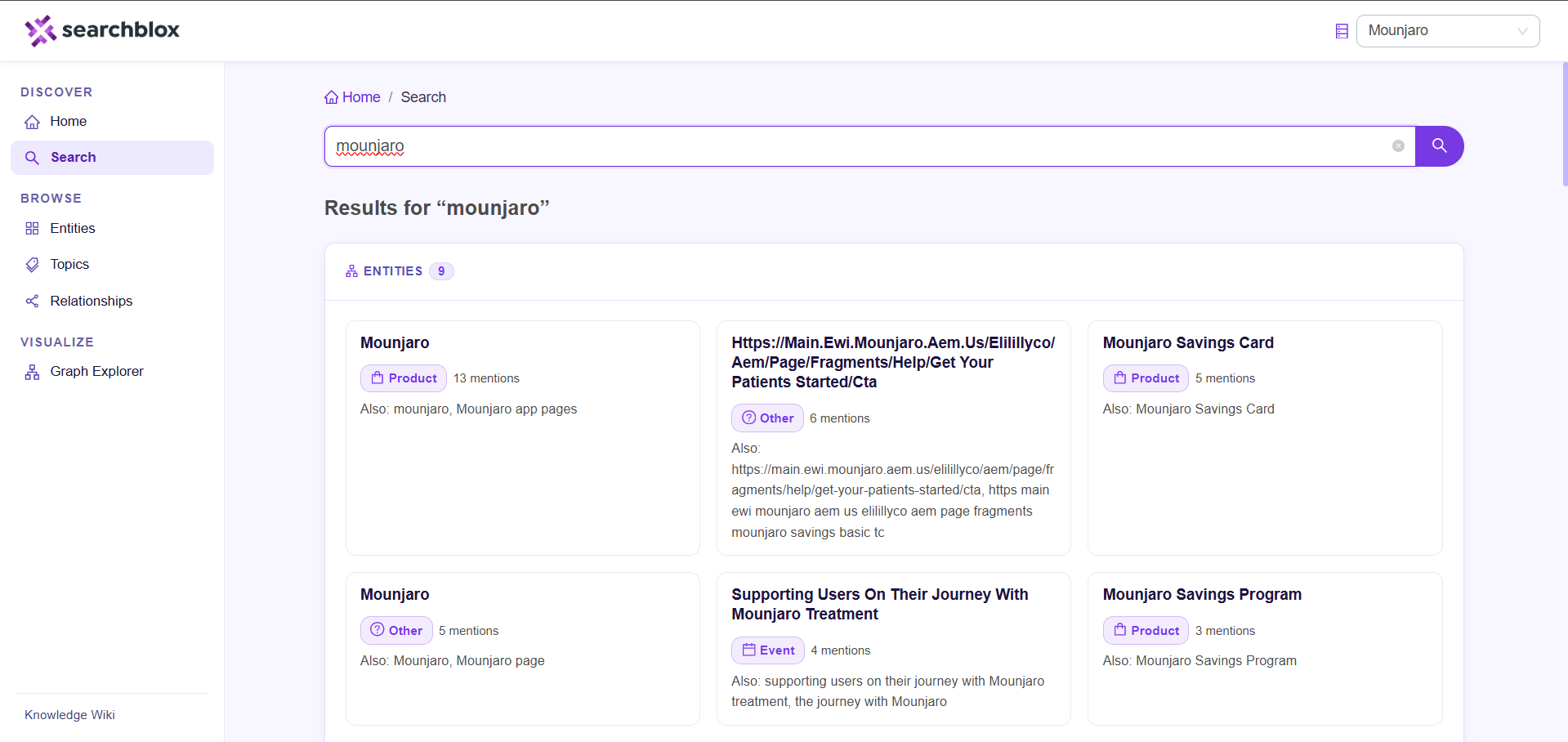
Entities section — Shows knowledge graph entities that match your query. Results include
similar entities that share related characteristics, presented as clickable cards. Click any entity
card to open its detail page.
Documents section — Shows documents from the collection that are relevant to your query.
Each result displays:
- Document title (links to the source document)
- Document type
- A highlighted snippet showing the matching passage
Results load 10 at a time. Click Load more to fetch the next 20 results. The counter below the
button shows how many results are currently displayed out of the total found.
Related Topics — A row of topic tags derived from the search results. Clicking a topic
navigates to its Topic detail page.
Browse
The Browse page provides structured exploration of the full knowledge graph, organised into
tabs.
Entities Tab
Browse and filter all entities in the knowledge graph.
- Use the filter sidebar on the left to narrow results by entity type (e.g. show only
"Technology" entities). - Use the search box in the sidebar to search by name within the selected type.
- Results appear as an entity card grid. Click any card to open the Entity detail page.
- Use the pagination controls at the bottom to move between pages (15 entities per
page).
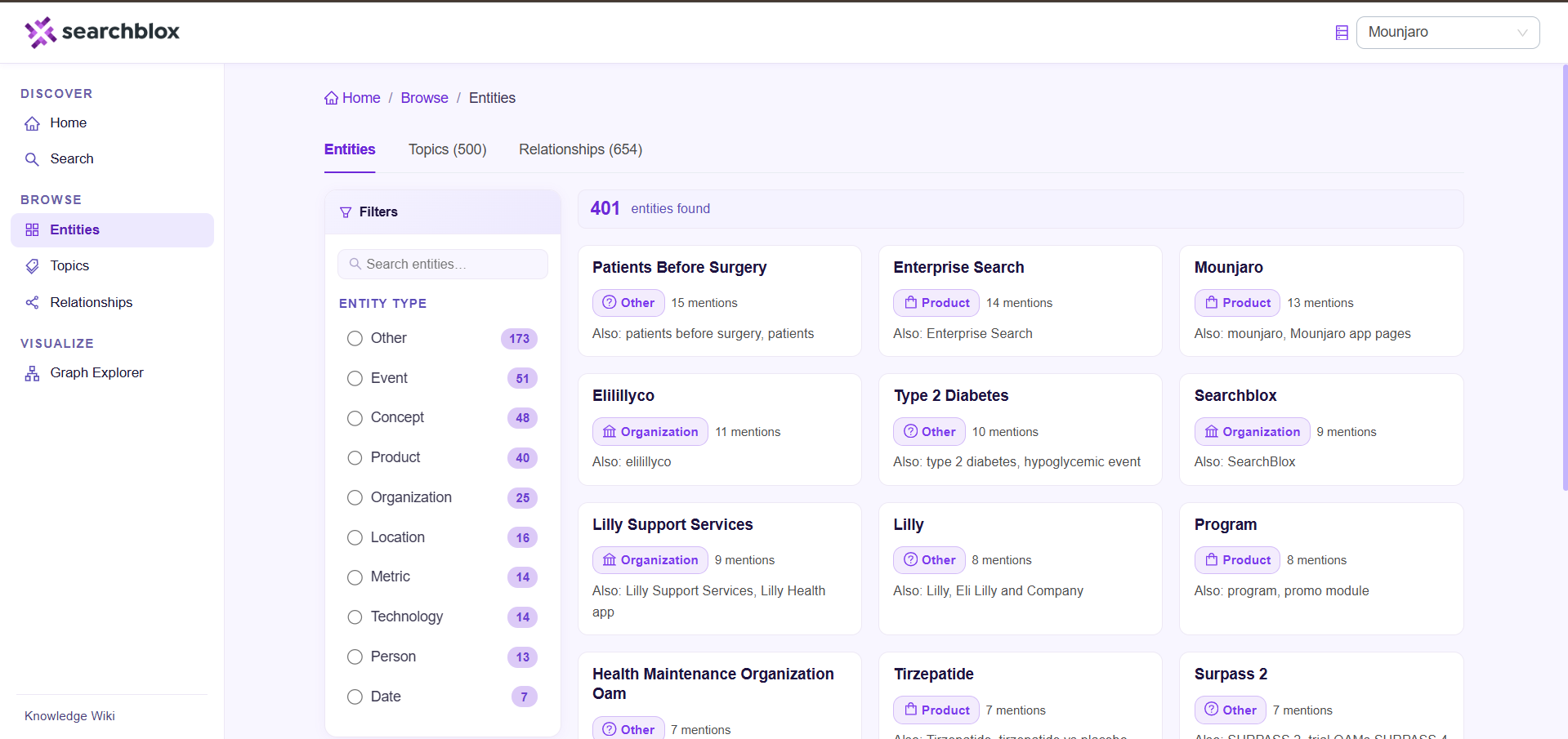
Note: The filter sidebar is hidden automatically when the collection has no entity
type data available
Topics Tab
Browse all topics extracted from the knowledge graph.
- All topics are shown as clickable tags. Clicking a tag navigates to the Topic detail page.
- Use the filter input at the top to narrow the displayed topics by name.
- The tab label shows the total count of topics available.
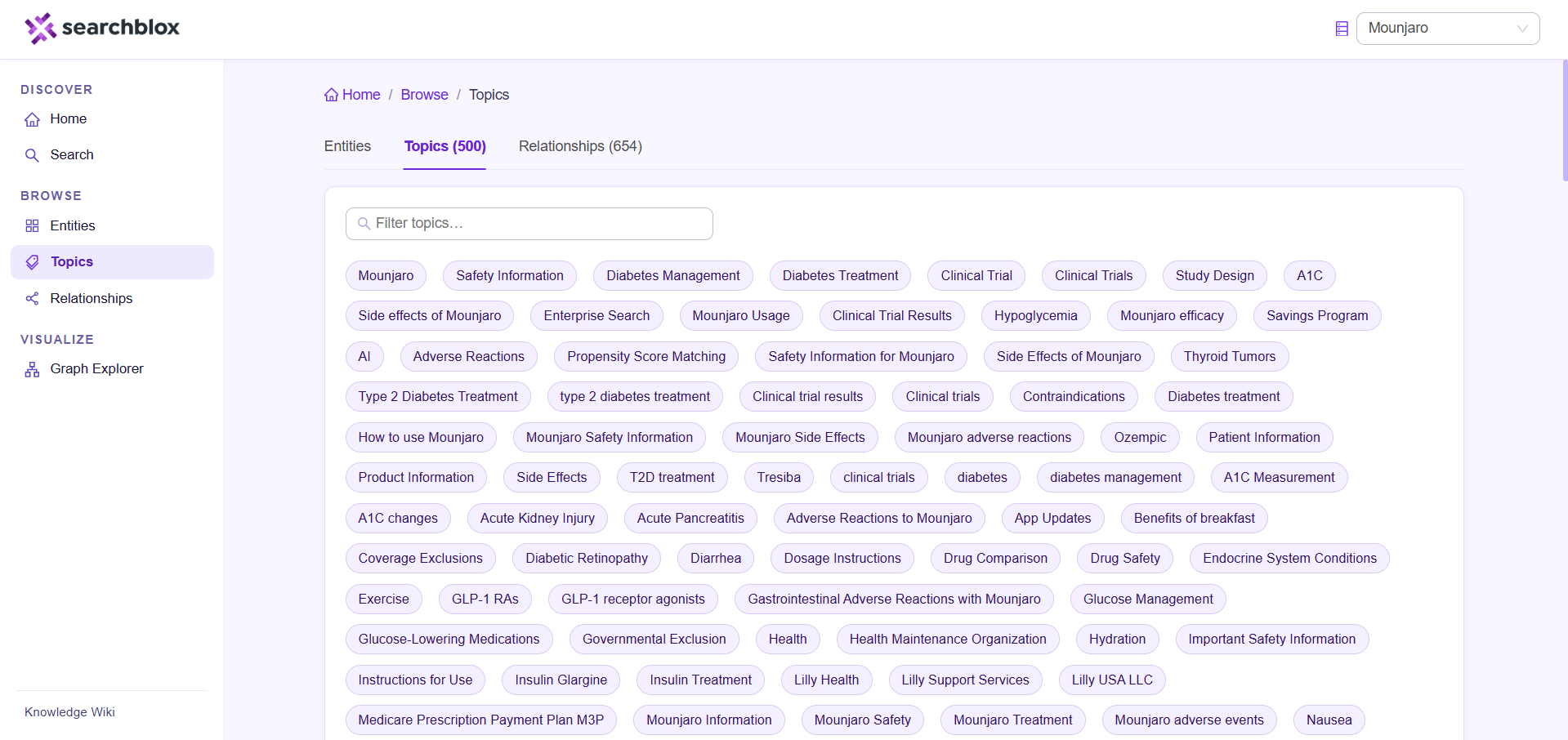
Note: The filter input is hidden when no topics are available
Relationships Tab
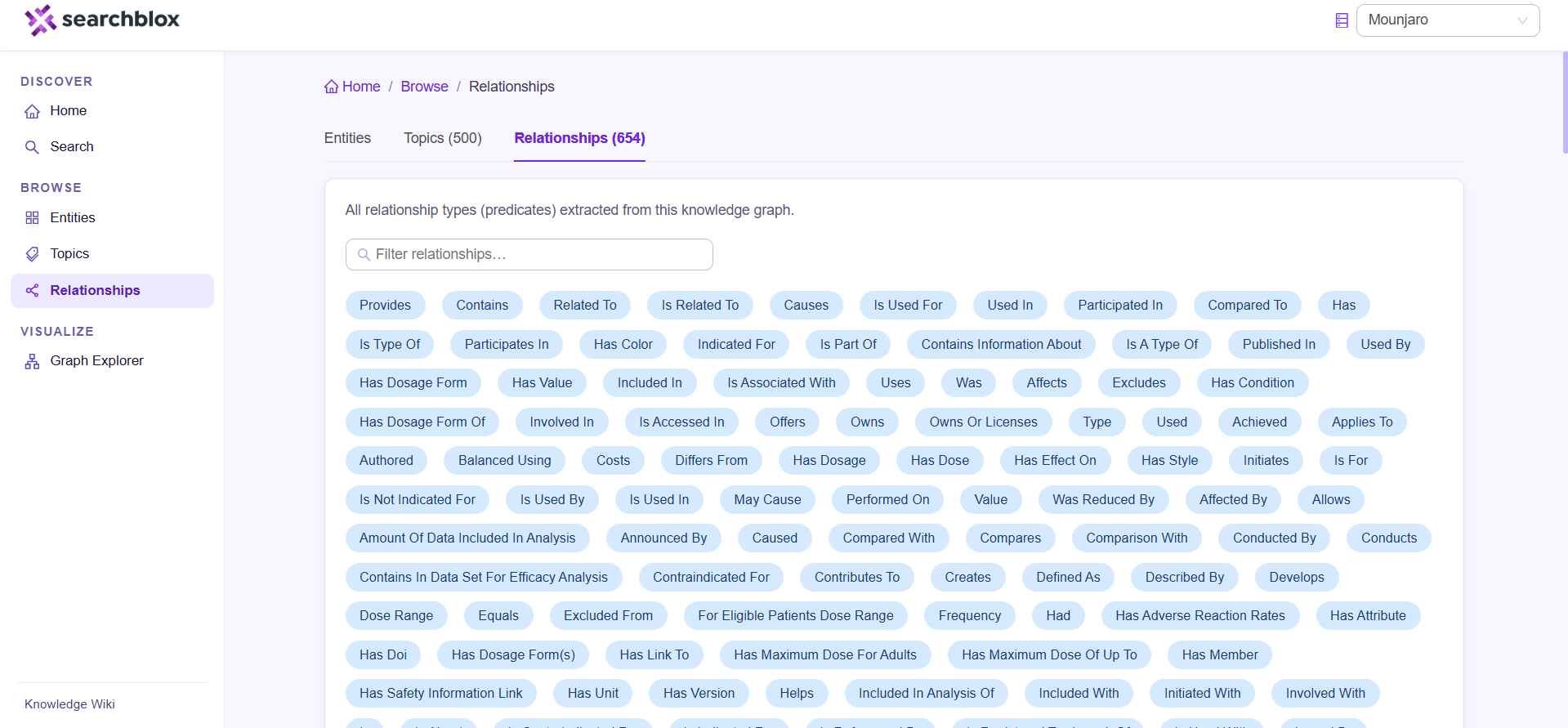
Browse all relationship types (predicates) extracted from the knowledge graph.
- All relationship types are shown as tags with their occurrence counts (e.g. "Developed
By (45)"). - Use the filter input at the top to search for a specific relationship type by name.
- Relationship names are shown in a human-friendly format (e.g. is_part_of is
displayed as "Is Part Of").
Entity Page
The Entity detail page shows everything known about a single entity.
Header information:
- Entity name in title case, with the original extracted name shown below if it differs
- Entity type badge (e.g. Technology, Person, Organization)
- Alternative names (aliases)
- Number of mentions across the corpus
- Extraction confidence score
- Description or summary
Neighborhood Graph
A small interactive graph on the right side of the page shows the entity and its directly connected entities (up to 15). Click any node to navigate to that entity. Click Full Graph to open the full Graph Explorer centred on this entity.
Relationships
Two views of the entity's connections
- By Predicate — Relationships grouped by type (e.g. all "Developed By" connections together). Each group shows the direction of the relationship ( outgoing,→ ← incoming) and the connected entities as clickable links. Click Show more / Show less to expand or collapse a group.
- All Triples — A table view of every individual relationship, showing Subject, Predicate, Object, and Confidence. Click any entity name in the table to navigate to that entity.
Related Entities
A grid of other entities that are related to this one, based on knowledge graph proximity.
Source Documents
A list of documents that mention this entity. Each document shows its type, complexity level, the number of times the entity is mentioned, and its associated topics.
Document Detail
The Document detail page shows the knowledge graph context extracted for a single document.
- View Source button — Opens the original source document in a new browser tab.
- Executive Summary and Technical Summary — Two parallel summaries: a high-level
overview and a technical deep-dive. - Key Takeaways — The most important points extracted from the document.
- Action Items — Recommended next steps identified in the document.
- Metadata — Categorised tags showing the document's Topics (clickable), Audience,
Roles, Use Cases, Industries, and Prerequisites. - Learning Path — A sequence of documents recommended for progressive learning.
The current document is highlighted in the path. Click any step title to navigate to that
document. - Related Reading — Three columns of document recommendations:
a. Similar Documents — Content covering the same subject area.
b. Prerequisites — Documents recommended to read first.
c. Follow-up Reading — Documents recommended to read next.
Topic Detail
The Topic detail page aggregates all content related to a specific topic.
- Documents — All documents in the collection associated with this topic.
- Related Entities — Entities that are linked to this topic in the knowledge graph.
- Related Topics — Other topics that frequently appear alongside this one, derived from
shared document context. Click any tag to explore that topic.
Graph Explorer
The Graph Explorer provides a full-screen, interactive visualisation of the knowledge graph.
Left control panel:
- Node Limit — Choose how many nodes to display at once: 10, 50, 100, 250, or 500
(default: 50). Higher limits show more of the graph but may require more time to render. - Entity Types — Check or uncheck entity types to show or hide them in the graph. Use
All or None to quickly toggle all types. Only types present in the current data are listed. - Graph stats — Displays the current number of visible nodes and edges.
- Interaction hints — A quick reference for mouse and keyboard controls.
Interacting with the graph:
| Action | Result |
|---|---|
| Click a node | Opens a detail panel showing the entity's name, type, and mention count |
| Double-click a node | Navigates to the Entity detail page |
| Right-click a node | Expands the node's direct connections |
| Drag a node | Pins the node to a fixed position |
| Scroll/Pinch | Zoom in or out |
| Click and drag (background) | Pan the view |
Node selection panel — When a node is selected, a floating panel appears (top-right of the
canvas) with:
- The entity name, type, and mention count
- View Entity Page — navigates to the full Entity detail page
- Expand Connections — loads the entity's direct neighbours and adds them to the current graph view without a full reload
Graph layout: - Node size scales with how frequently the entity is mentioned — more prominent entities
appear larger. - Arrows on edges indicate the direction of each relationship.
- Hovering over an edge reveals its relationship label.
- The graph auto-fits to the visible area on load.
Note: Filtering by entity type hides both the nodes of that type and any edges that connect to them. Re-enabling a type restores those nodes and their connection.
Updated 23 days ago