
Personalization
Introduction
SearchBlox offers optimized search with added personalization to improve the user experience. While following GDPR and CCPA guidelines, it uses anonymized data without storing any personally identifiable information. SearchBlox analyzes browsing behavior and site usage to deliver more relevant search results, even for new users visiting your website. With AI-driven personalization, businesses can better engage visitors, provide relevant content quickly, and guide them toward making purchases. This helps increase customer engagement, improve conversions, and raise the average order value, ultimately maximizing overall profitability.
Architecture
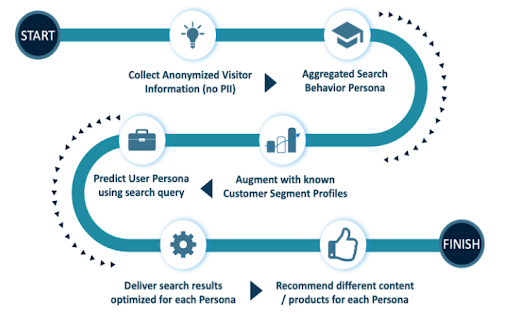
Steps to setup Personalization
-
Make sure you are using SearchBlox version 9.2.3 or later to enable personalization on your website. If you are using an older version, upgrade to a newer version to access these additional features.
-
After upgrading to version 9.2.3 or higher, wait for about one month so that enough search data can be collected. The more search data available, the more accurate and useful the recommendations will be.
-
SearchBlox personalization helps improve the search experience by providing users with more relevant and personalized results. This keeps customers engaged and helps serve them better without requiring extra effort from administrators.
API ERROR CODES
- Status Code 500 – This appears when there is an internal server error.
- Status Code 524 – This appears when the server is down or not responding.
During both these scenarios please ensure to contact our customer support for further help.
| Status Code | Status Message |
|---|---|
| 500 | Internal Server Error |
| 524 | Time out error |
Conclusion
SearchBlox allows you to customize search results based on customer preferences with minimal effort. This helps improve customer satisfaction, increase user engagement, and ultimately boost overall profitability.
Updated 26 days ago